Product UX / UI
Messenger App UX Case Study
The goal of this project was to streamline the complex and often frustrating process of planning group outings. By integrating a structured decision-making tool directly into Messenger - used by 100% of my research participants - I aimed to eliminate communication chaos and reduce the high rate of abandoned plans.
Tools: Figma
Quantitative Research
Surveys
of users cited the Messenger app as their primary tool for planning outings with friends.
of users reported that they had completely canceled their plans because the planning process was too chaotic.
of users indicated that the biggest problem during planning is people who skip voting in polls or fail to respond to messages.
of users said they find it difficult to schedule a meeting because of the different time slots that work for everyone.
of users said they plan to go out in groups at least a few times a month.
of users reported that they were unable to find final decisions.
* Research Note: This study was conducted on a relatively small sample size, which may influence the statistical precision of the findings. In future iterations with a dedicated budget, the research scope should be expanded to a broader demographic to eliminate potential biases and minimize the margin of error.
User Interviews
"I can see everyone has read the group message, but nobody votes. Everyone is just waiting for someone else to make the decision for them."
"Everyone agrees on a date, we start planning, and then suddenly one person says it doesn't work for them, even though they never mentioned it before."
"I post a poll and wait for two days, but half the group doesn't click anything until I start tagging them individually. I feel like a total pest."
"Standard Messenger polls are too rigid. Often a date works for me 'only if' it’s nearby, or it’s just a 'maybe'-there's no way to indicate that."
"I miss having an option to say: 'This day is absolutely impossible for me.' Without that, current pools don't reflect reality."
"There's a total lack of decisiveness or specifics; the whole process of agreeing on an outing takes way too long."
User Persona

Alex
22 years old
A working student who has a group of friends with whom he tries to stay in touch regularly. He has experience with technology and uses mobile apps on a daily basis. The main messaging app he uses is Messenger.
Understanding
Empathy Map
SAYS
Let's set a date for our trip to the mountains. Would you prefer this weekend or next?
THINKS
I'd like to finalize the date soon because I need to let my workplace know when I'll be away. I hope it goes quickly.
DOES
He posts in the group, creates a poll, and waits for people to vote.
FEELS
At first, he feels stressed because the deadline is approaching, and if he doesn’t let his employer know in advance, he won’t get his time off. On top of the stress, he feels frustrated because some people don’t even check the group.
Defining the Problem
User Painpoints
There is no tool for quickly and clearly selecting the option that suits us and the one that is definitely out of the question.
Lack of engagement in the decision-making process (not reading or ignoring messages or polls in the group chat).
Problem Statement
Working students, like Alex, need a quick and straightforward way to reach a consensus on the type and timing of a trip, because the current confusion over Messenger and the lack of clear commitments from friends lead to stress and the cancellation of plans (which affects as many as 71% of users).
Ideate Phase
SCAMPER Method
Replace open-ended text chat with a dedicated "Decision Module" focused on eliminating scheduling conflicts.
Integrate the phone’s native calendar with Messenger to provide real-time visibility of participants' availability.
Implement a travel-booking style interface (e.g., Skyscanner) for selecting preferred vs. impossible date ranges.
Add "Hard Decline" options to polls and automate smart push notifications for inactive participants.
Repurpose the scheduling logic for other group decisions, such as voting on locations or activities.
Remove dates from the interface as soon as they are flagged as "impossible" by any key participant to shorten the decision path.
Shift from "choosing a date" to "rejecting proposals," where the system suggests slots and identifies the one with the least resistance.
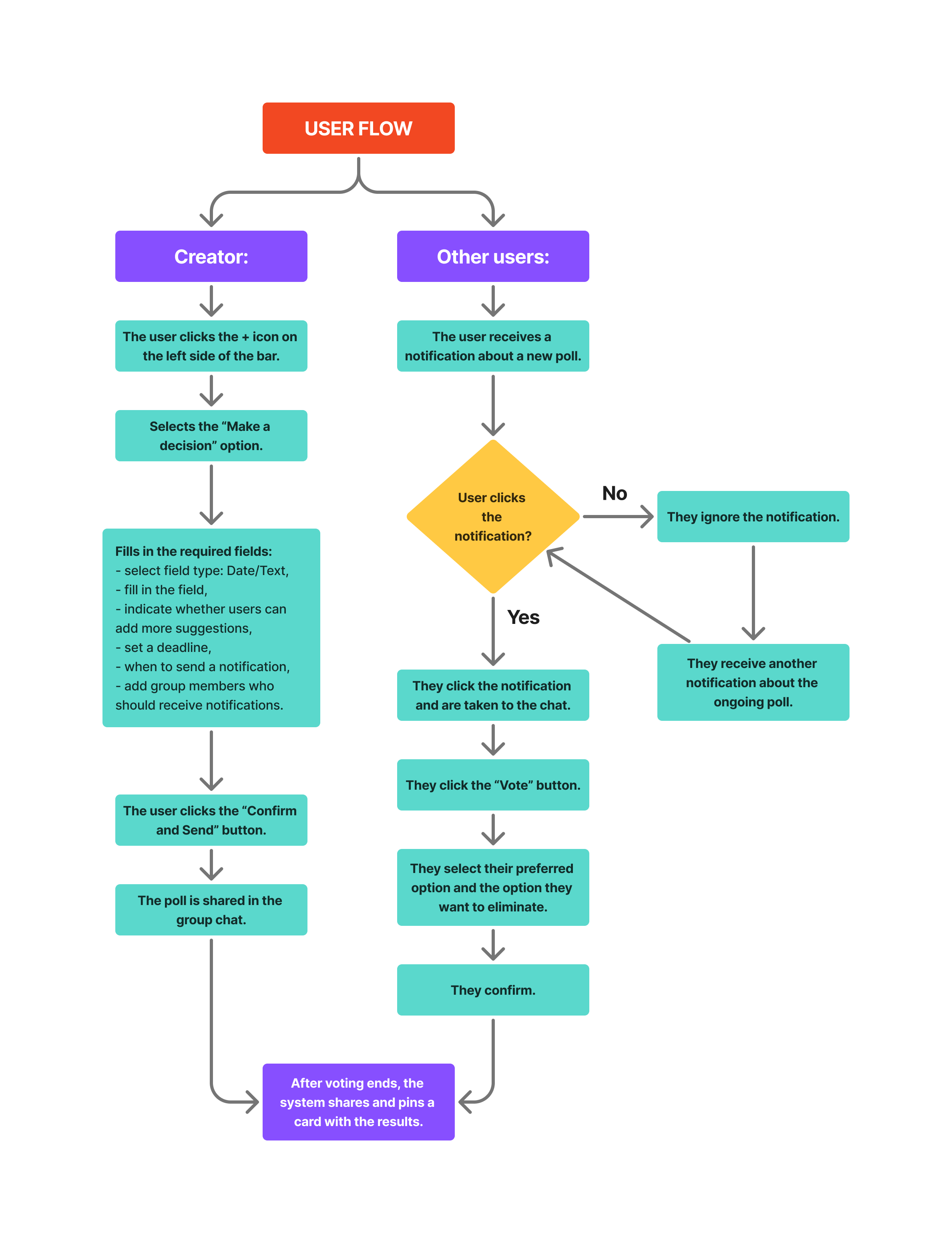
User flow
Low Fidelity
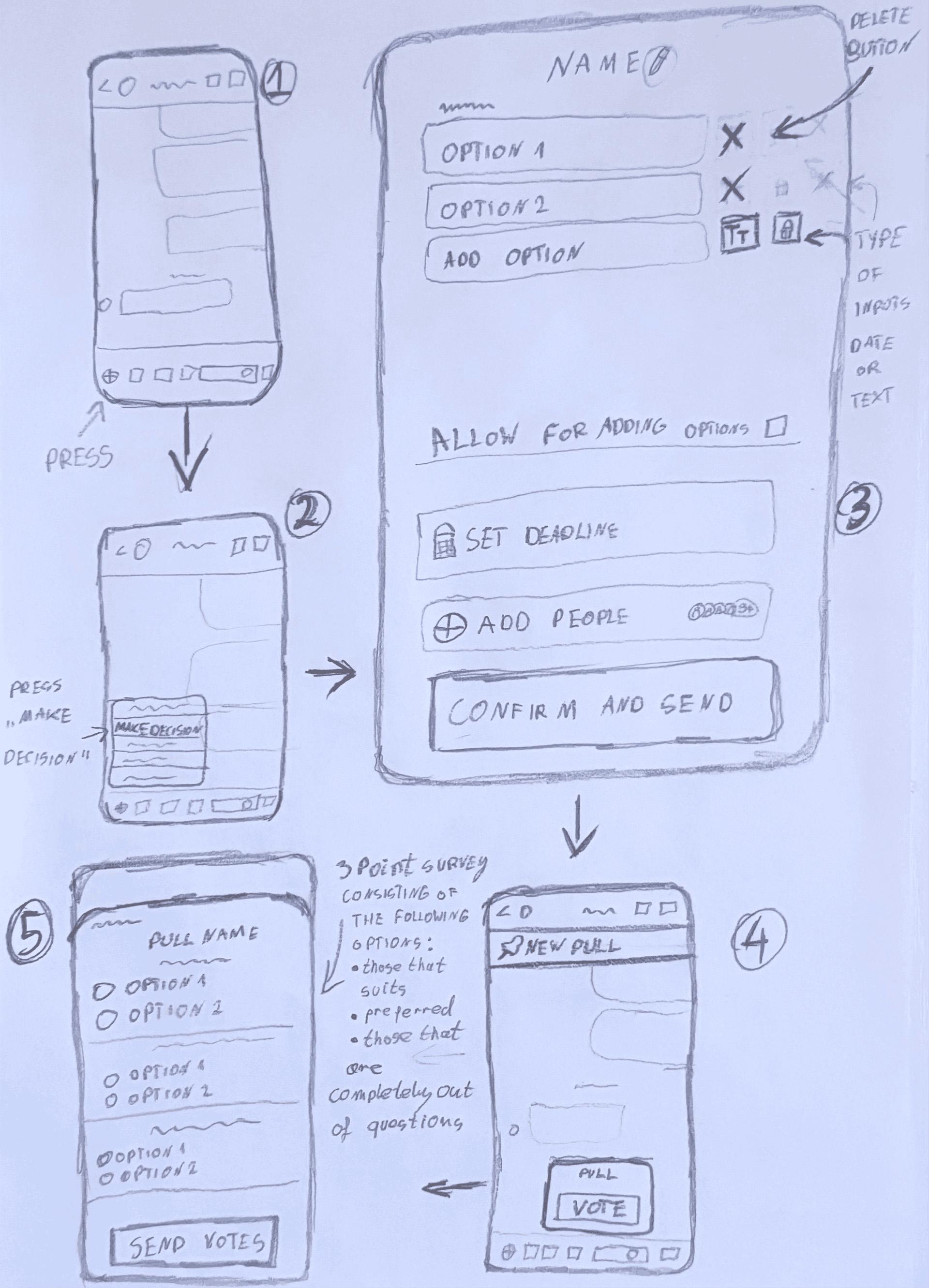
Sketches
Stand Out
Unique Features
Feature 01
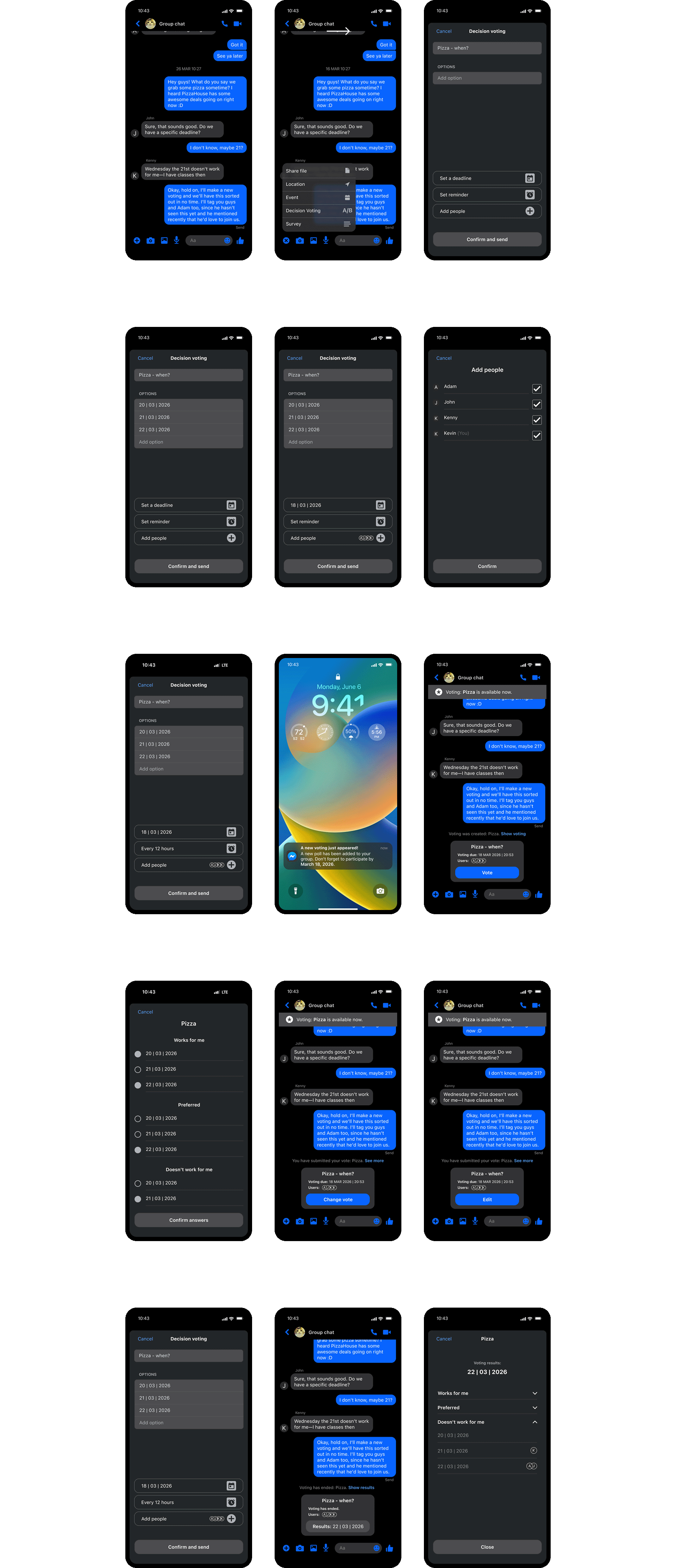
Users can now create a poll that allows them to select the options they like / prefer / don't like, which makes it easy to identify the best choice.
Feature 02
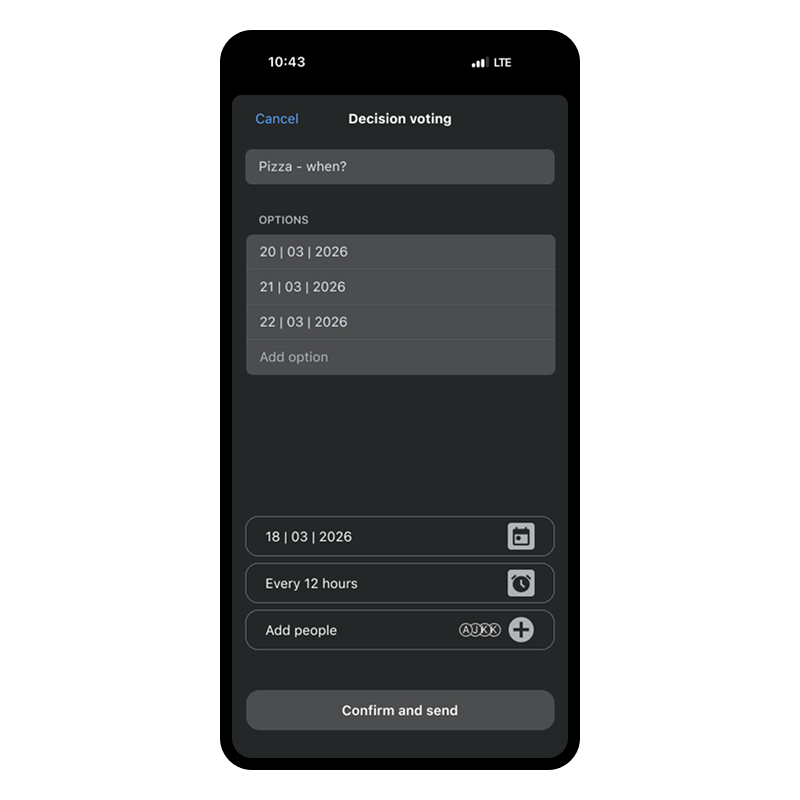
When creating a poll, users can add people to the poll, and those people will then receive push notifications and be tagged in the group chat.
Feature 03
The poll is pinned at the top of the chat so that everyone knows it's there.
Feature 04
Once voting has ended, the algorithm identifies the option that best suits everyone, prioritizing first and foremost the presence of each person selected in the vote and, secondarily, the preferred choices. Each user can access the summary and view the detailed voting results.
Final Design Evolution
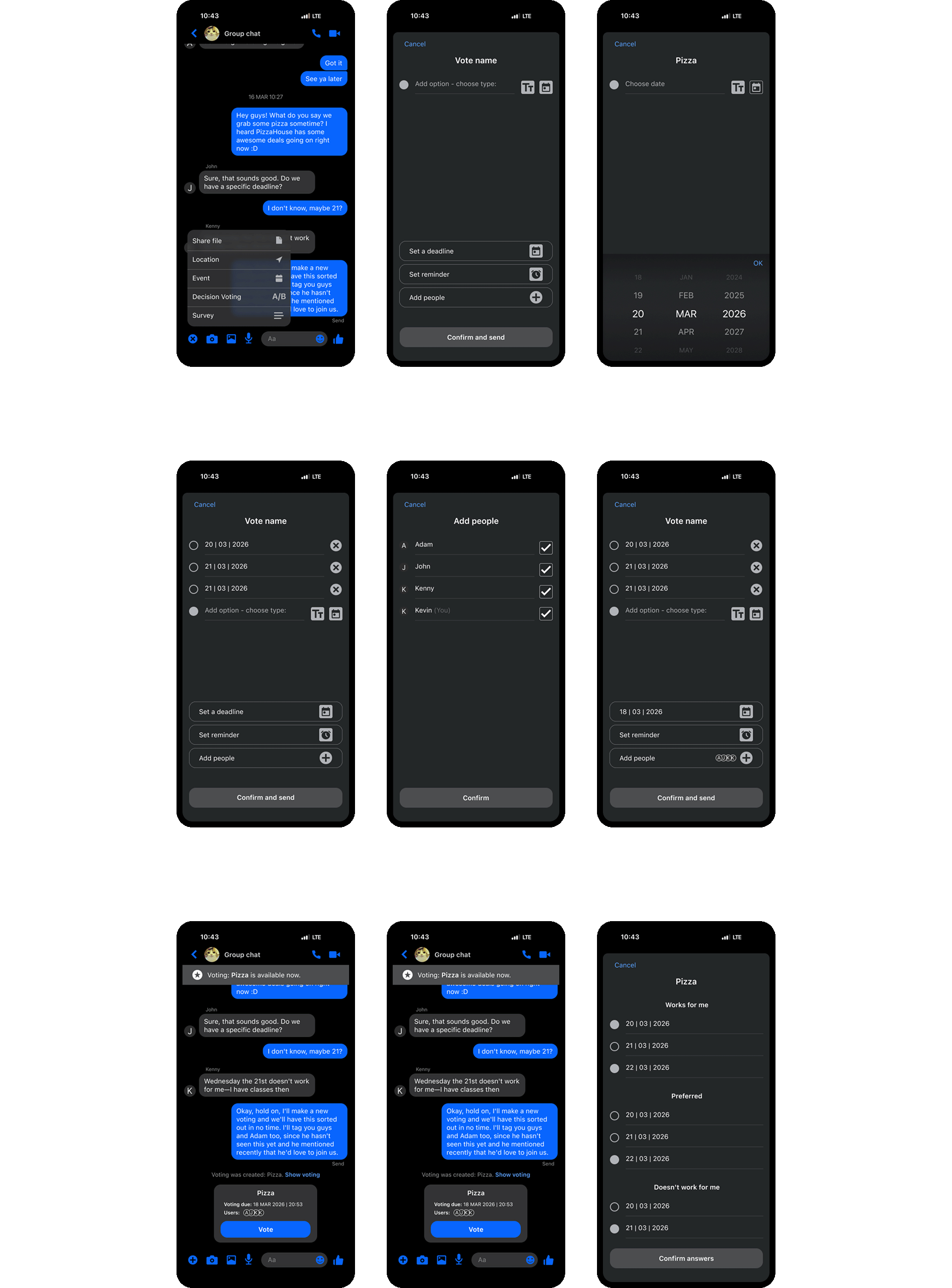
First design
Feedback
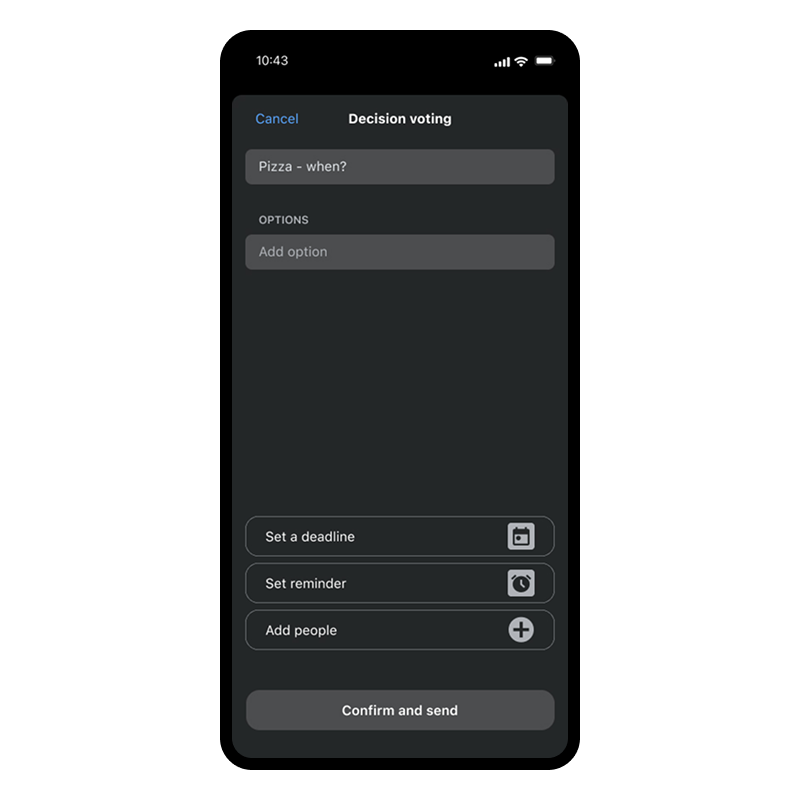
The option to select a text field or a date field has been removed. This decision has reduced cognitive load and streamlined the process of creating a poll.
The ability to edit a poll while it is active has been added (only the creator can do this). After each edit, users receive a notification about changes to the poll.
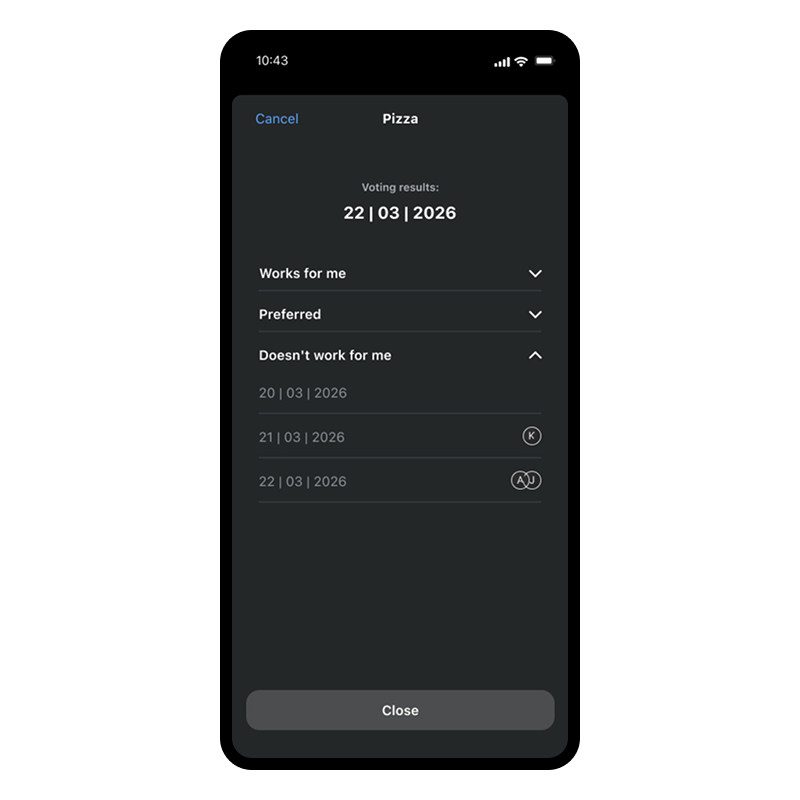
A final view has been added that allows you to preview the proposed result along with the voting details.
Final design